

Tech-savvy at 55+ – Technology should make life easier, not riskier. Discover practical digital tips, simple password solutions and essential scam warnings to stay connected, confident and secure.

Love it or hate it – Technology has become part of almost everything we do. We use it to communicate with family, manage our finances, book holidays, shop, find information and even consult our doctors.
And the good news? You don’t have to be a technology expert to enjoy its benefits.
Whether you’re already comfortable with your smartphone or still occasionally wondering where that photograph disappeared to, there are simple ways to make technology work better for you.
At You’ve Earned It (YEI), we believe that staying digitally connected is about much more than keeping up with technology. It’s about independence, confidence, convenience and enjoying the opportunities that technology brings.
Here are some practical tips to help you get more out of your digital life while protecting yourself from the growing number of online scams. If you’re not sure how to go about some of these practical tips, ask a younger family member to assist you.
Stop trying to remember dozens of passwords
This has got to be one of the biggest frustrations of technology: passwords!
Every website, app and online service seems to demand a password. It must be long, include numbers and symbols, and preferably be different from every other password you use.
Who can remember them all?
The solution: Use a password manager.
A password manager securely stores your passwords and can fill them in automatically when you log in. Instead of remembering dozens of passwords, you generally only need to remember one strong master password.
Here are some free password managers worth considering:
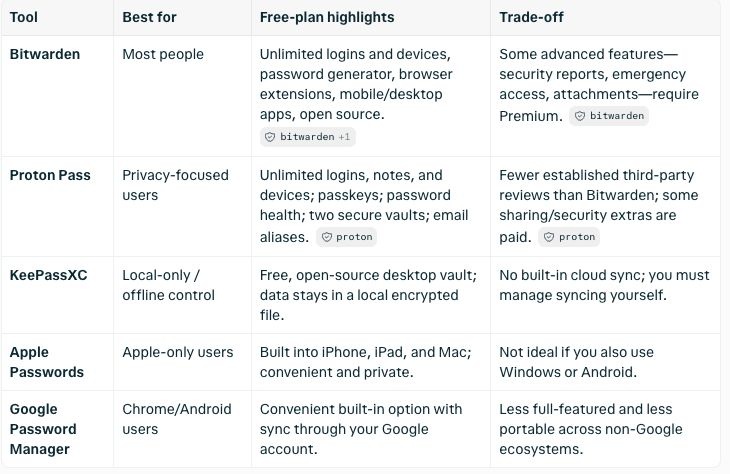
YEI tip: Start by saving the passwords for a few websites you use regularly. Once you’re comfortable, gradually add the others. Protect your password manager with a strong master password and two-factor authentication. Never share your master password or banking PIN.
Make your phone easier to read, hear and use
Several YEI members have been asking us to make the text on the website and in the YEI newsletter bigger. However, you don’t have to struggle with small text, quiet notifications or complicated screens. Most smartphones and tablets have accessibility features that can make a remarkable difference.
We suggest that you try these simple adjustments:
• Increase the font size and screen brightness.
• Turn on voice typing so you can dictate messages instead of typing.
• Use the magnifier or camera to read small print on labels and menus.
• Activate captions when watching videos.
• Set up emergency contacts and medical information on your phone.
On an iPhone, look under Settings > Accessibility. On Android, look for Settings > Accessibility, although menus may differ between devices.
YEI tip: Ask someone to help you set up your phone exactly the way you like it. Once it’s done, everyday tasks can become considerably easier.
Let technology do some of the work for you
Did you know that you can ask your phone questions on Google instead of typing everything?
Try saying:
“What’s the weather forecast for tomorrow?”
“Remind me to take my medication at eight o’clock.”
“How do I get to the nearest pharmacy?”
Apple’s Siri and Google’s voice features can help with many everyday tasks.
You can also explore artificial intelligence tools such as ChatGPT to help explain unfamiliar terms, plan a holiday, suggest recipes using ingredients you already have (this is a fabulous tool – try it!) or draft a difficult email.
YEI tip: AI can be a useful assistant, but it can also make mistakes. Always check important medical, legal and financial information with a reliable source. Never enter passwords, banking PINs or confidential personal information into an AI chatbot.
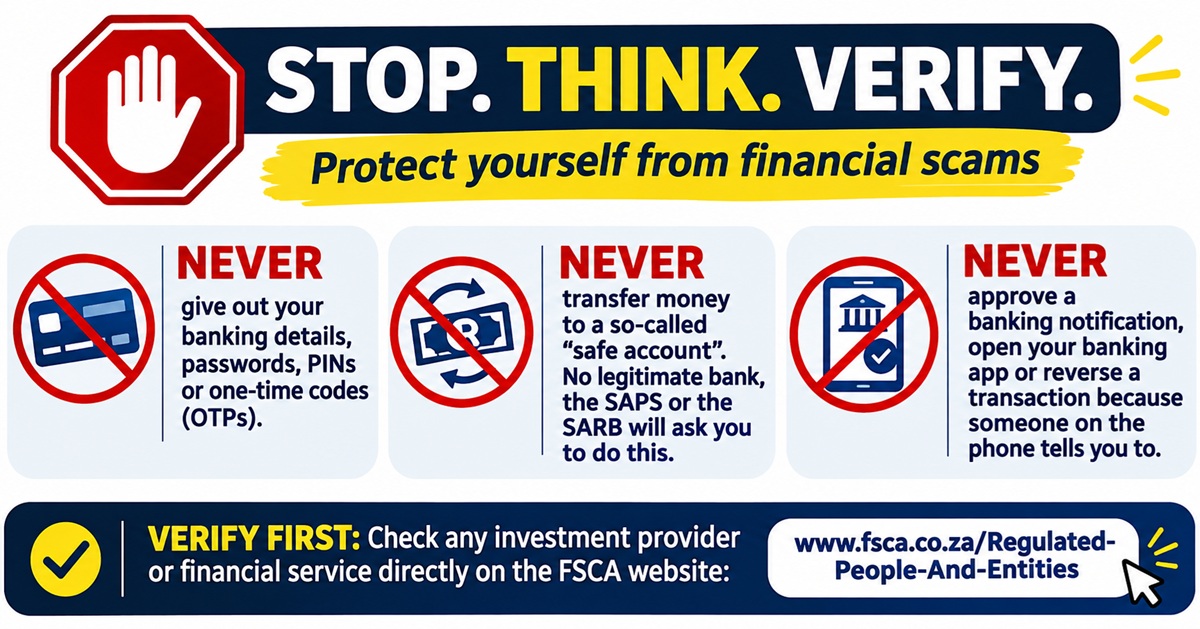
Protect yourself from increasingly sophisticated scams
Scams are everywhere so this is possibly the most important digital skill of all. No doubt you all know at least one person who has been scammed in one way or the other – be it financial or on a personal level.
Financial impersonation scams have become increasingly sophisticated. Criminals can pretend to be representatives of banks, financial institutions, government departments or even someone you know.
They may contact you by telephone, email, SMS or WhatsApp. Some use artificial intelligence to imitate familiar voices or create convincing videos.
The objective is usually the same: to frighten you, confuse you or create a sense of urgency so that you act without thinking.
Remember these golden rules:
• Never give out personal or banking information during an unsolicited phone call. NEVER – EVER! This includes passwords, PINs, one-time passwords (OTPs), card details and identity information.
• Never transfer money into a so-called safe account. A legitimate bank, the South African Reserve Bank or SAPS will not ask you to do this.
• Never approve a banking notification because someone on the phone tells you to. If you’re asked to open your banking app, approve a payment or reverse a transaction, end the call.
• Don’t trust a caller simply because they know your name or personal details. Scammers can obtain information from leaked databases and social media.
• Do not click on a suspicious WhatsApp or SMS link, even if the message appears to come from a familiar organisation.
• Be suspicious of investment opportunities promising unusually high returns. Check the provider independently before parting with your money. The old adage – if it’s too good to be true, it probably is.
If someone claims to be calling from your bank, hang up and contact the bank yourself using the number on your bank card or its official website.
You can check whether a financial services provider is authorised through the Financial Sector Conduct Authority (FSCA). Remember that criminals may impersonate genuinely authorised providers, so check contact details independently too.
YEI tip: If someone pressures you to act immediately, that is your signal to stop. A genuine organisation will allow you time to verify a request.
Learn to recognise fake WhatsApp messages and AI-generated scams
WhatsApp is a wonderful way to stay connected, but it has also become a popular tool for fraudsters.
You might receive a message claiming that a family member has lost their phone and urgently needs money. Or someone may send you an investment opportunity supposedly endorsed by a well-known South African personality.
Increasingly, scammers are using deepfakes, which are convincing but artificially generated videos, images or voices.
A voice message might even sound exactly like someone you know.
The solution: If a family member unexpectedly asks for money, tell the caller that you will phone them back on the phone number you have. When you phone your family member back, and if you’re still uncertain, ask a question only that person would know.
You can also activate WhatsApp’s two-step verification feature under Settings > Account > Two-step verification, and use its privacy settings to limit who can add you to groups.
YEI tip: Never share a WhatsApp registration code, even with someone claiming to be a friend. That code could give a criminal access to your account.
Add a second lock to your online accounts
Even a strong password can be stolen. That’s why two-factor authentication, sometimes called 2FA, is so important.
It provides an additional layer of security when logging into an account, such as a code from an authenticator app or confirmation on a trusted device.
Start by enabling it on your email account, password manager and important online services. Where available, you can also use passkeys, which allow you to sign in securely using your fingerprint, face recognition or device PIN.
YEI tip: Your email account is particularly important because it is often used to reset passwords for other services. Protect it carefully.
Keep your devices updated and backed up
Those software update notifications can really be annoying, especially when they appear just as you’re trying to do something! But don’t ignore them.
Updates frequently contain important security improvements that help protect your phone, tablet or computer against newly discovered threats.
Turn on automatic updates where possible and download apps only from official stores.
Most modern devices also have built-in security protection. Additional antivirus software is not always necessary, particularly if your device is kept updated and you use it sensibly.
Another useful habit is backing up your information. Services such as iCloud and Google Photos can automatically back up photographs, while other cloud services can protect documents and important files. Check what is included in your free storage allowance before paying for more.
YEI tip: Imagine losing your phone tomorrow. Would you still have access to your photographs, contacts and important documents? If not, now is the time to set up a backup.
Shop online confidently, but carefully
Online shopping can save time, effort and money, particularly when comparing prices or purchasing items that are difficult to find locally. But not every online store is genuine. I have seen several online clothes stores for women of late. I am quite certain that some of these are scams. Again, too good to be true..
Before purchasing, check that the retailer has credible contact details, clear delivery and returns policies, and independent customer reviews.
Be especially cautious of advertisements on Facebook or Instagram offering expensive products at unbelievably low prices.
YEI tip: Set your spending limit on your account and avoid making payments through links sent by unknown sellers.
Take control of your privacy on social media
Sharing photographs, celebrating family milestones and reconnecting with old friends are some of the joys of social media. However, it’s worth reviewing how much personal information you share publicly.
For example, announcing that you’re leaving for a three-week overseas holiday tells more than just your friends that your home may be empty.
Check your Facebook privacy settings and decide who can see your posts, photographs and personal details. In addition, be cautious about accepting friend requests from strangers, even when they appear to have mutual friends.
YEI tip: You don’t need to share your phone number, home address or date of birth publicly to enjoy social media.
Discover how technology can simplify everyday life
Technology isn’t only about banking, emails and social media.
There are countless practical ways it can make everyday life more convenient and enjoyable.
You could:
• Use Google Maps to plan a journey or find a nearby restaurant.
• Borrow digital books through an available library service or download ebooks.
• Make video calls to family and friends living overseas.
• Use a medication reminder on your phone.
• Photograph important documents so you can find them easily, while keeping sensitive copies in secure storage.
• Explore online courses, language lessons or hobbies.
YEI tip: Choose one new digital skill to learn each month. It might be something as simple as sharing your location with a friend, booking a theatre ticket online or creating a photo album. Small achievements build confidence.
Don’t let grandchildren accidentally spend your money
Handing your phone or tablet to a grandchild can be a wonderful way to keep them entertained. But games and apps sometimes offer in-app purchases, and a few innocent taps could result in unexpected charges. The solution is to require authentication for purchases and, where available, disable in-app purchases or use parental controls.
On Apple devices, explore Screen Time settings. On Android devices, check the purchase verification settings in Google Play.
YEI tip: Rather than deleting your browsing history, concentrate on securing your accounts, locking your device and keeping payment approvals protected.
Know what to do if you think you’ve been scammed
Even people who are highly experienced with technology can be caught by a convincing scam. The important thing is to act quickly.
If you believe you’ve shared banking information, approved a fraudulent transaction or transferred money to a scammer:
1. Contact your bank’s fraud department immediately, using its official telephone number. Ask it to secure your accounts and investigate the transaction.
2. Change any compromised passwords using a trusted device.
3. If someone has accessed your phone or computer remotely, disconnect it from the internet and seek trusted technical assistance.
4. Keep screenshots, messages and transaction records as evidence.
5. Report the incident to the SAPS and relevant fraud reporting services.
Scammers are going to a whole new level with the sophistication of scams. Targeting older people has become prevalent. An SA Fraud Prevention Services representative, Nazia, joins YEI in a podcast which speaks about how to prevent scams. A YEI member shares his expertise on this topic and speaks about his experience on being scammed. Check it out here.
Remember, reporting a scam quickly may help prevent further losses, although recovering money is not guaranteed.
Ask for help, and keep learning
Nobody knows everything about technology. Even people who have used computers for decades occasionally need assistance.
Ask a trusted friend, family member or knowledgeable professional to show you how something works. Better still, ask them to let you do it yourself while they guide you. You’ll learn far more by practising than by watching someone else take over your phone.
And never feel pressured to learn everything at once. Technology should make life easier, not more complicated.
The YEI message: Be curious, be confident, but be cautious
Technology offers enormous opportunities to stay connected, independent, informed and engaged with the world around us. The trick is to embrace what is useful, ignore what isn’t and develop a few sensible habits that protect you online. You don’t need to know everything. You simply need the confidence to keep learning and the wisdom to recognise when something doesn’t feel right. And remember one particularly important rule: Never let anyone rush you into sharing personal information or moving money. When in doubt, hang up, check independently and ask for help.
A YEI article
